JavaScript Modules: Import and Export Explained (Beginner-Friendly Guide)
In this article, we’ll understand what modules are, why they are needed, and how import and export work, using very simple examples. Even if you are a beginner or a non-technical reader, you’ll be able to follow along comfortably.

JavaScript has come a long way—from writing small scripts inside a single <script> tag to building large, complex applications used by millions of users.
But as JavaScript applications grew, one big problem appeared:
Code became hard to manage.
This is where JavaScript Modules come into the picture.
In this article, we’ll understand what modules are, why they are needed, and how import and export work, using very simple examples. Even if you are a beginner or a non-technical reader, you’ll be able to follow along comfortably.
1. The Problem: Why Do We Even Need Modules?
Let’s start with a situation most beginners face.
Imagine This Scenario
You are building a small web application:
Some code handles user login
Some code calculates prices and discounts
Some code manages UI behavior
At first, you might write everything in one JavaScript file:
// app.js
function loginUser() { ... }
function calculatePrice() { ... }
function showModal()
{ ... }
// 500+ lines later...
What Goes Wrong Over Time?
As the project grows:
The file becomes too long
Finding a specific function becomes difficult
Changing one part may accidentally break another
Reusing code in another project becomes painful
Multiple developers editing the same file causes conflicts
This is called a code organization problem.
Large files = confusion, bugs, and frustration.
2. The Solution: JavaScript Modules (Simple Meaning)
A module is simply:
A JavaScript file that contains related code and can share it safely with other files.
Instead of one huge file, we split code into smaller, meaningful files.
Example of Modular Thinking
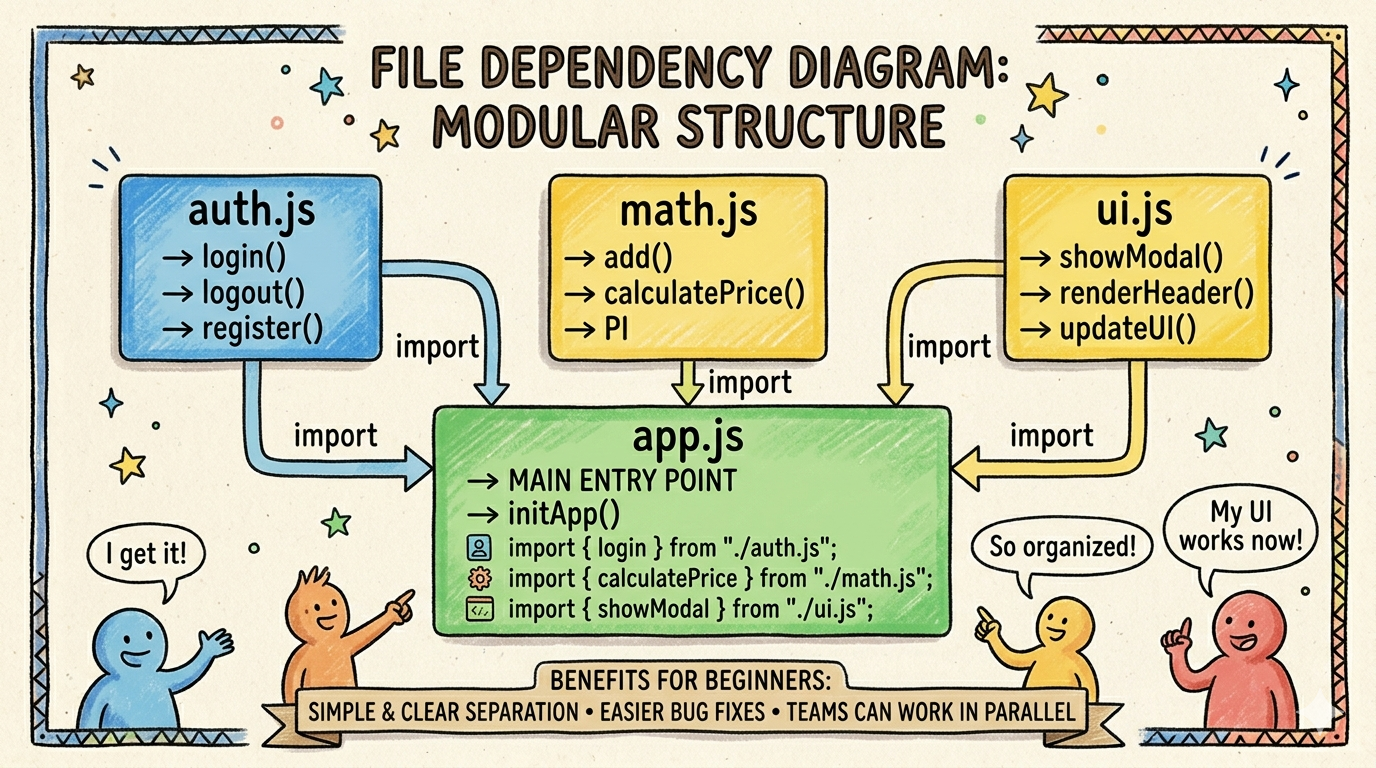
auth.js→ authentication logicmath.js→ calculationsui.js→ UI related codeapp.js→ main entry point
Each file has one clear responsibility.
3. Exporting Functions or Values (Sharing Code)
By default, code inside one file is private.
To use it elsewhere, we must export it.
Example: Exporting from a Module
math.js
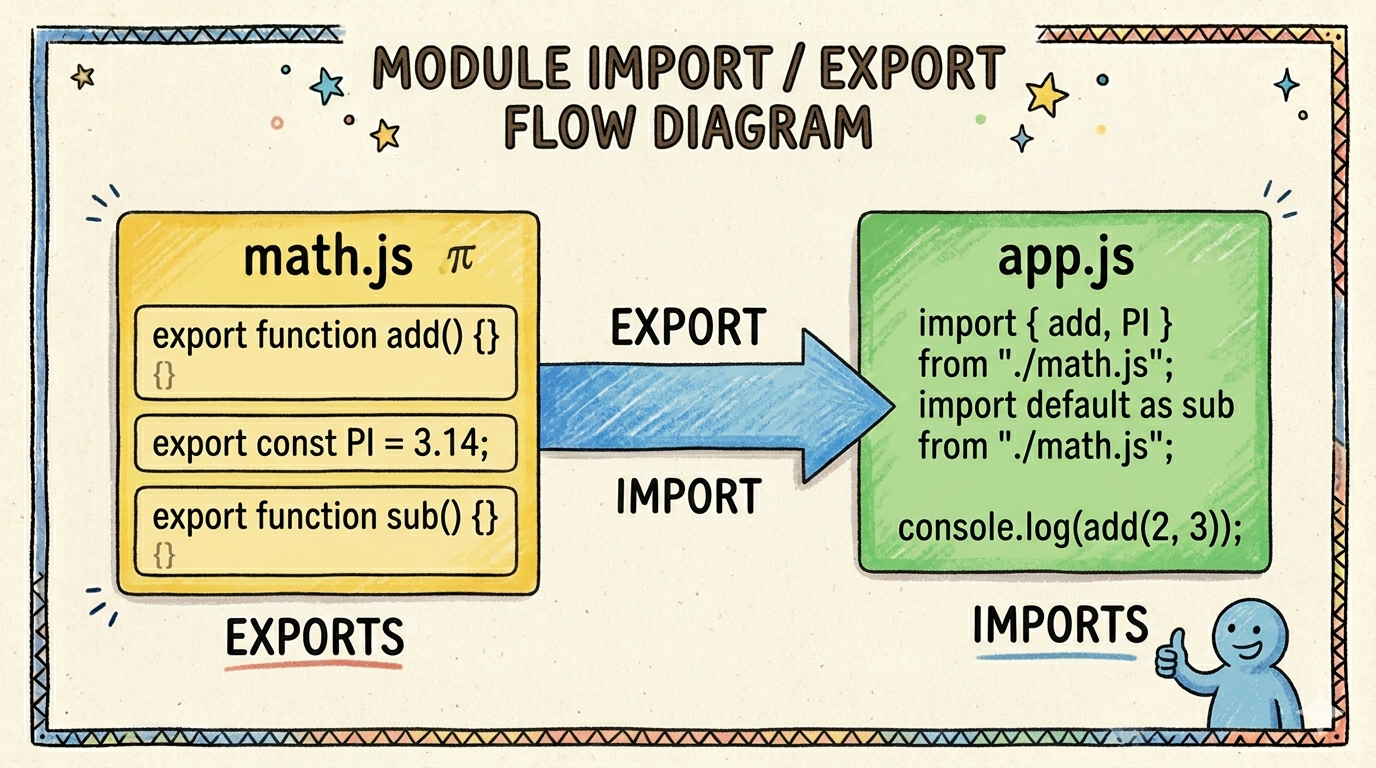
export function add(a, b) {
  return a + b;
}

export const PI = 3.14;
What’s happening here?
addfunction is marked asexportPIconstant is also exportedThis means other files can now use them
Think of
exportas saying:
“Hey, other files are allowed to use this.”
4. Importing Modules (Udhari ka code ^-^ )
Now let’s use the exported code.
app.js
import { add, PI } from "./math.js";

console.log(add(2, 3)); // 5
console.log(PI);        // 3.14
Breaking This Down in Simple Words
importbrings code from another file{ add, PI }must match the exported names"./math.js"means “from the same folder”
You only import what you need, not the entire file.
This keeps your code clean and efficient.
5. Default vs Named Exports (Keep in mind)
JavaScript supports two types of exports:
Named exports
Default exports
Let’s understand both clearly.
5.1 Named Exports (We can export Multiple function from one file)
We already saw this:
export function add() {}
export function subtract() {}
Importing:
import { add, subtract } from "./math.js";
✔ You must use the exact same names
✔ One file can have many named exports
5.2 Default Export (One Main Thing)
Sometimes a file has one main responsibility.
logger.js
export default function log(message) {
  console.log(message);
}
Importing:
import log from "./logger.js";

log("Hello World");
Key Differences (Easy Comparison)
| Feature | Named Export | Default Export |
|---|---|---|
| Number allowed | Many | Only one |
| Import name | Must match | Can be any name |
| Use case | Utilities | Main functionality |
Tip for beginners:
If a file does one main job, use default export.
6. How Modules Improve Maintainability (Big Advantage)
Now let’s connect everything to real benefits.
Without Modules
One giant file
Hard to debug
Hard to test
Hard to reuse
With Modules
Small, focused files
Easy to understand
Easy to change
Easy to reuse
Team-friendly
Example:
Bug in calculation? → Open
math.jsLogin issue? → Check
auth.js
No confusion. No searching through hundreds of lines.
7. Benefits of Modular Code
Here’s why professionals always use modules:
Better readability – code feels organized
Reusability – same module used in multiple projects
Maintainability – changes are localized
Scalability – project grows without chaos
Team collaboration – less conflict, clearer roles
Modules turn JavaScript from “messy scripts” into clean software.
Final Thoughts
JavaScript modules are not an advanced concept—they are a necessary foundation for writing clean and professional code.
You don’t need to build huge apps to use modules.
Even small projects benefit from them.
If you remember just one thing, remember this:
One file = one responsibility.
Export what’s needed. Import only what you use.
That’s the heart of JavaScript modules.


