Callbacks in JavaScript: Why They Exist
JavaScript is one of the most powerful and flexible languages—but for beginners, it can also feel confusing. One concept that often scares people is .callbacks, here below is the step-by-step break down of callback

JavaScript is one of the most powerful and flexible languages—but for beginners, it can also feel confusing. One concept that often scares people is .callbacks
You might hear sentences like:
“JavaScript is asynchronous”
“Use callbacks to handle async operations”
“This leads to callback hell”
If you’re new or even non-technical, these lines can feel overwhelming.
Don’t worry.
By the end of this article, callbacks will feel natural and logical, not scary.
Functions Are Values in JavaScript (The Foundation)
Before understanding callbacks, we must understand one core idea:
In JavaScript, functions are values, Yes, just like: numbers, strings, arrays.
This means:
Functions can be stored in variables
Functions can be passed as arguments
Functions can be returned from other functions
Example: Function Stored in a Variable
const greet = function () {
  console.log("Hello!");
};

greet(); // Hello!
Here, greet is not just a name, it holds a function value.
Think of functions like:
Numbers (
10)Strings (
"Hello")Objects (
{})
JavaScript treats functions the same way.
Function Calling Another Function (Simple Flow)
Now let’s see one function calling another.
function sayHello(name) {
  console.log("Hello " + name);
}

function processInput(callback) {
  const fullName = "Mohammad Asad";
  callback(fullName);
}

processInput(sayHello);
What happens here?
see we call processInput with passing
greetfunction as an argument. And then inside another function, it was called. This is a callback.
👉 This passed function is called a CALLBACK FUNCTION
So What Exactly Is a Callback?
Let me say it in the simplest way: A callback is a function passed into another function to be called later. That’s it, nothing complicated.
➡️ Function Call Flow Diagram
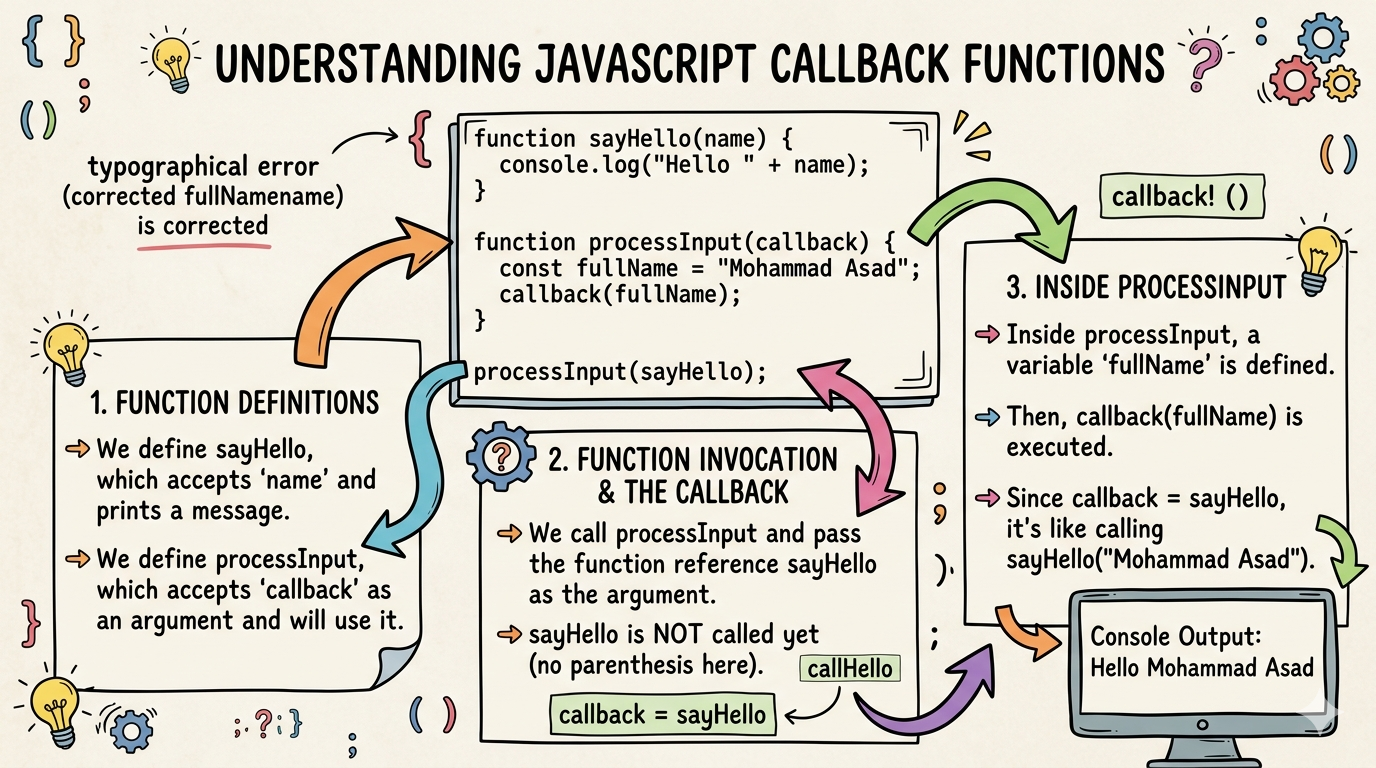
Diagram Idea:
processInput(callback)
      ↓
  sayHello(name)
      ↓
  "Hello Mohammad Asad"
This is synchronous execution — one step after another.
What Is a Callback Function actually is? (Simple Definition)
A callback function is a function that is passed into another function and is executed later.
Why the name “callback”?
Because:
You give your function to someone else
They call it back when their work is done
Real-Life Analogy
📞 Phone Repair Example
You give your phone to a repair shop
You give them your number
They call you after repair is complete
That phone call = callback
Why Callbacks Are Used in Asynchronous Programming
JavaScript runs in a single thread.
That means it can do only one thing at a time.
But some tasks take time:
Fetching data from a server
Reading files
Timers (
setTimeout)Database queries
JavaScript cannot wait and block everything.
Example Without Callback (Impossible)
const data = fetchFromServer(); // takes 3 seconds
console.log(data);
Now image data take too much this would freeze the whole program ❌
Example With Callback (Correct Way)
function fetchData(callback) {
  setTimeout(() => {
    const data = "User Data";
    callback(data);
  }, 3000);
}

fetchData((result) => {
  console.log(result);
});
What happens?
JavaScript starts fetching
Moves on (does not wait)
Once data is ready → callback runs
✅ Smooth and non-blocking
6. Callback Usage in Common Scenarios
Callbacks are everywhere in JavaScript, even if you didn’t realize, you’re already using callbacks.
1️⃣ Timers
setTimeout(() => {
  console.log("Runs after 2 seconds");
}, 2000);
The arrow function is a callback.
2️⃣ Array Methods
const numbers = [1, 2, 3];

numbers.forEach((num) =>{
  console.log(num);
});
Here, the function passed to forEach is a callback.
3️⃣ Event Handling
button.addEventListener("click", function () {
  console.log("Button clicked");
});
Click handler = callback,
That function runs only when the event happens.
Understanding Callback Timing (Point to be noted)
Callbacks are not executed immediately.
console.log("Start");

setTimeout(() => {
  console.log("Inside callback");
}, 1000);

console.log("End");
Output:
Start
End
Inside callback
📌 Key Concept
JavaScript registers the callback and continues execution.
The Basic Problem: Callback Nesting (Beginner Nightmare [-_-] )
Now comes the dark side of callbacks.
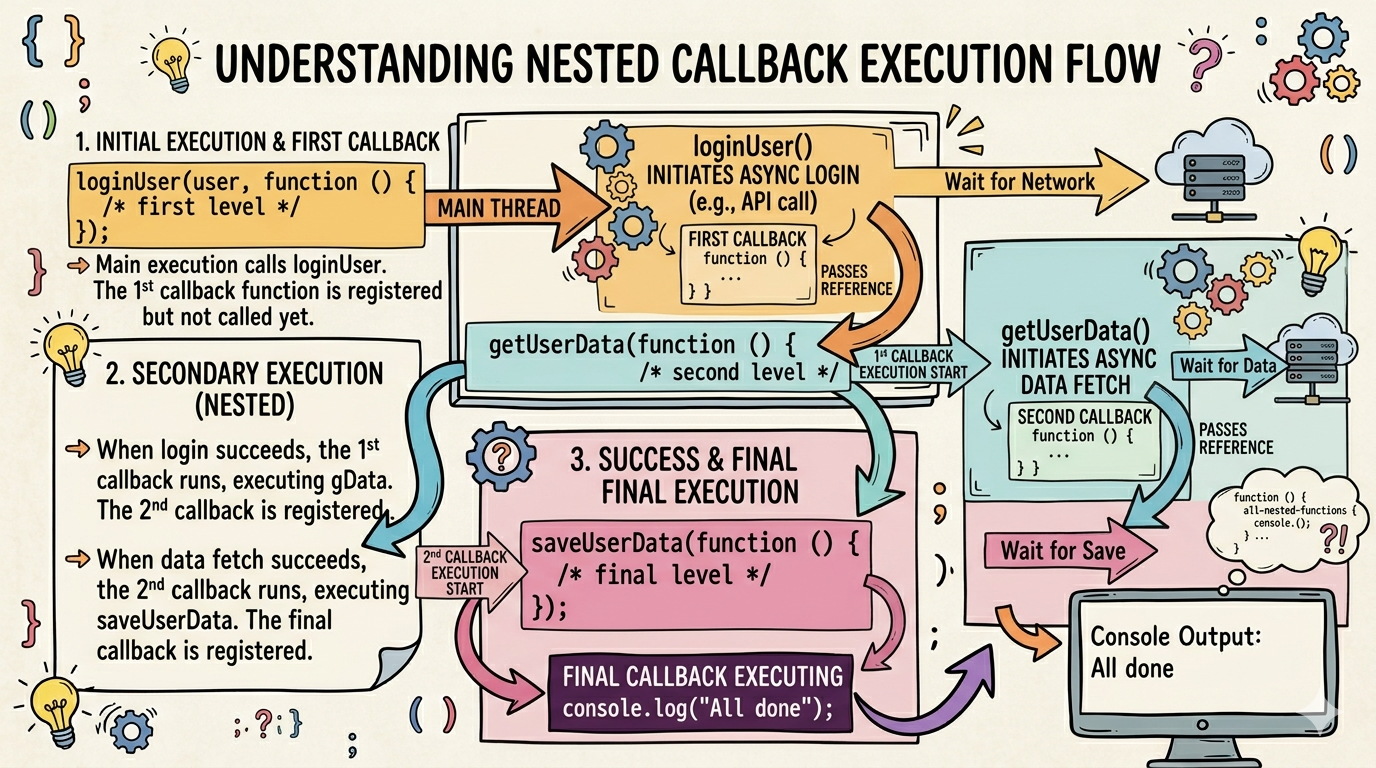
Nested Callbacks Example Imagine this:
loginUser(user, function () {
  getUserData(function () {
    saveUserData(function () {
      console.log("All done");
    });
  });
});
What’s the issue?
Hard to read
Hard to debug
Hard to maintain
Error handling becomes messy
This is called:
Callback Hell (Pyramid of Doom)
Now look at this structure.
loginUser
   ↓
getUserData
      ↓
saveUserData
         ↓
   "All done"
The code keeps going deeper and deeper. This is called: Callback Hell, Visually looks like a pyramid ⛏️
Why Callback Nesting Is a Problem
Callbacks themselves are not bad.
The problem is:
When logic becomes deeply dependent
When each step waits for the previous one
When everything is tightly coupled
Think of it like:
One person cannot move unless the previous one finishes breathing.
This makes code fragile and confusing.
Visualizing Nested Callbacks
Task 1
  └── Task 2
        └── Task 3
              └── Task 4
Looks messy, right? That’s the problem.
So What Did Developers Do?
Callbacks solved async problems… But created readability problem. so developers introduced Promises, Async/Await. But callbacks are still important. Because everything async in JS is built on top of callbacks.
One Simple Way to Think About Callbacks
Whenever you see a callback, just think: “This function will run later.”
That’s it.
Small Practice Example
Try this:
function greetUser(name, callback) {
  console.log("Hi " + name);
  callback();
}

function sayBye() {
  console.log("Bye!");
}

greetUser("Asad", sayBye);
Output:
Hi Asad
Bye!
Final Thoughts: Why Callbacks Exist
Callbacks exist because:
JavaScript is non-blocking
Tasks take time
We need a way to say:
“Do this AFTER that finishes”Callbacks were:
The first solution
A necessary solution
A foundation for Promises and async/await
If you understand callbacks well,
👉 Modern JavaScript becomes easy
Key Takeaways
Functions are values in JavaScript
Callbacks are functions passed to other functions
They help handle asynchronous operations
Overuse leads to callback nesting problems
Understanding callbacks builds strong JS fundamentals


