Synchronous vs Asynchronous JavaScript
This article will explain: What asynchronous code means, Why JavaScript needs asynchronous behavior, Real-life examples like API calls and timers and Problems caused by blocking code

When people start learning JavaScript, one confusion appears again and again:
“Why does JavaScript behave strangely when dealing with time, API calls, or delays?”
The answer lies in understanding synchronous and asynchronous behavior.
This article will explain:
What asynchronous code means
Why JavaScript needs asynchronous behavior
Real-life examples like API calls and timers
Problems caused by blocking code
We’ll move slowly, step by step, with visual thinking, so everything becomes crystal clear.
What Does Synchronous Code Mean (Let’s Start With Something Very Simple)?
Simple Definition
Synchronous code executes line by line, one step at a time.
Each line must finish before the next line starts.
JavaScript reads and executes code from top to bottom in order.
Step-by-Step Example (Imagine you wrote this)
console.log("SYN");
console.log("SYN-ACK");
console.log("ACK");
Now don't scared just read it, what will happen? JavaScript execute this code line by line.
Execution Flow
Print SYN
Print SYN-ACK
Print ACK
Nothing is skipped, Nothing overlaps, it just goes line-by-line and this is we called Synchronous execution
Real-Life Analogy 🧍♂️
Imagine standing in a single queue at a ticket counter:
Person 1 is served
Only after that, Person 2
Then Person 3
Everyone waits patiently, They don’t break the line, they first serve to a 1st person, then move to the next. That’s exactly how synchronous code works.
Simple, Straightforward, Predictable.
📌 Synchronous Execution Timeline Diagram
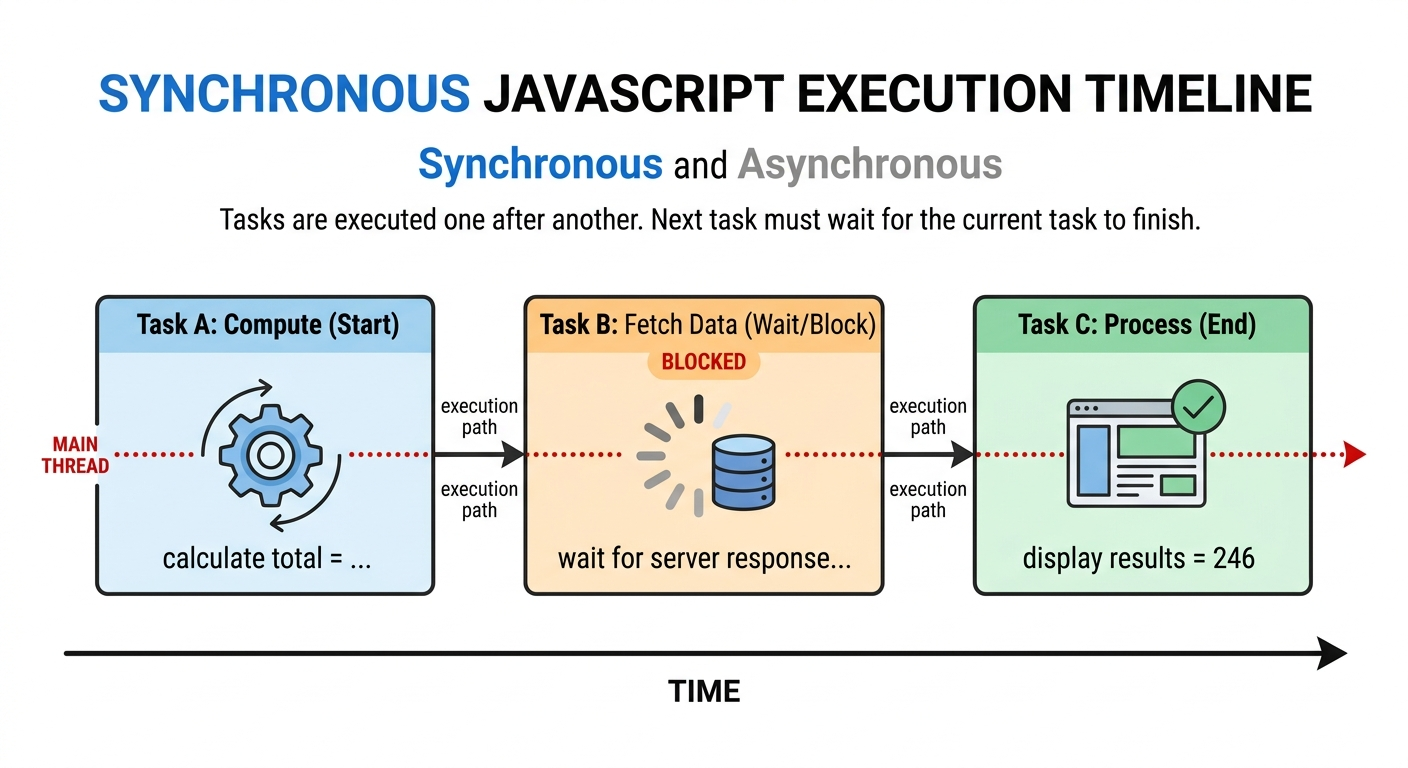
Lets come to the problem - What Is Blocking Code?
Everything feels fine… until some heavy takes comes in. Let’s say we add a heavy task in between.
Blocking code is a problem that can occur in synchronous execution.
What Does “Blocking” Mean?
If one task takes a long time, everything else must wait.
Example of Blocking Behavior
function longTask() {
  let start = Date.now();
  while (Date.now() - start < 5000) {
    // waits for 5 seconds
  }
}

console.log("Start");
longTask();
console.log("End");
What Happens?
"Start" prints JavaScript | freezes for 5 seconds | "End" prints only after waiting
👉 During those 5 seconds:
The page is unresponsive
Buttons don’t work
User feels the app is slow or broken
Why?
Because that while loop is taking time, and JavaScript is forced to wait. It cannot skip it. It cannot move ahead. It’s stuck. This is what we call: Blocking behavior, One slow task blocks everything else.
Real-Life Analogy (Lets understand with the real life example ⏳)
You ask a shopkeeper a question.
He says:
“Wait here. I’ll calculate something first.”
You are forced to stand idle, even if others could be served.
And this is why Asynchronous Comes to the Picture?
So what does Asynchronous Means:
Asynchronous code allows JavaScript to start a task and move on without waiting for it to finish.
It says:
“I’ll come back to this later when it’s done.”
Basic Example
console.log("Start");

setTimeout(() => {
  console.log("This runs later");
}, 2000);

console.log("End");
Now lets wait for a moment before look into output, just guess the Output..
❌ Most of the newly one think :
Start
This run later
End
But the Output Order is:
Start
End
This runs later // after 2 seconds
Then here the things actually shine (Hitesh sir POV: "Abhi chamka ✨ ")
Even though setTimeout appears in the middle, JavaScript does not wait for it.
What Actually Happened Here?
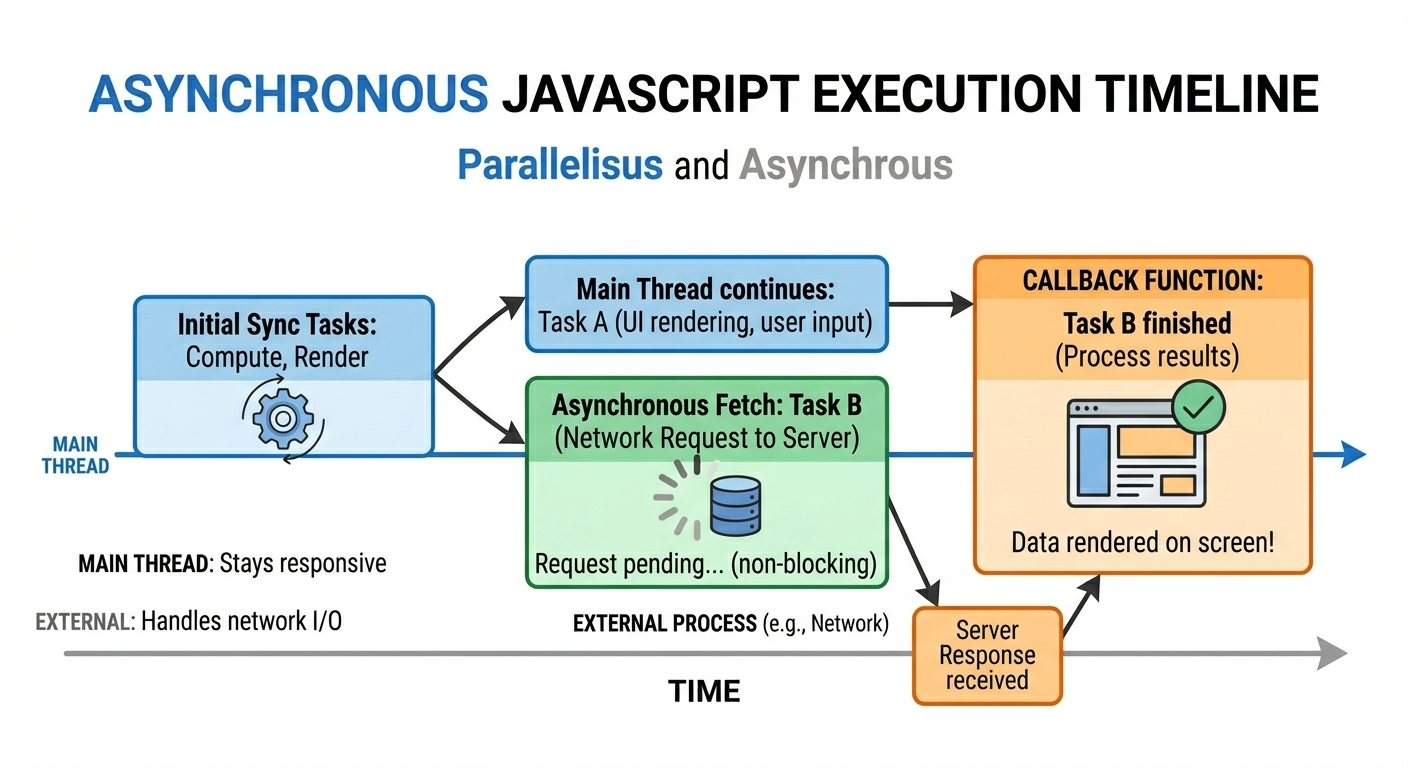
JavaScript saw setTimeout and basically said:
Okay, this will take time… I’ll handle it later.
So it didn’t wait. It immediately moved to the next line, so execution became:
Start → End → (after 2 seconds) This runs later
That’s asynchronous behavior.
Real-Life Analogy(asynchronous) ☕
You order coffee at a café:
You place the order
Instead of waiting at the counter, you sit down
When coffee is ready, they call your name
You didn’t block yourself.
Why JavaScript Needs Asynchronous Behavior
Comes to thing if every thing works fine, then why javaScript Needs Acynchronous behavour
JavaScript runs on a single thread:
Which means It can do only one thing at a time
Now think about:
API calls (internet requests)
File reading
Timers
Database queries
These tasks can take:
1 second may be 5 seconds or even more
If JavaScript waited synchronously for all of them:
The app would freeze, The UI would stop responding although User experience would be terrible
That’s why JavaScript uses:
✔️ Asynchronous behavior
✔️ Non-blocking execution
Let's Understand Blocking vs Non-Blocking (Core Difference)
Blocking Code ❌
When code is blocking, it behaves like this: You start a task => everything waits => then next task runs your app feels slow.
Stops everything
User must wait
App feels slow
Non-Blocking Code ✅
When code is non-blocking, it behaves like this: You start a task => JavaScript moves on => comes back later your app feels smooth.
Task runs in background
Main program continues
App stays responsive
Comparison Table
| Feature | Synchronous | Asynchronous |
|---|---|---|
| Execution | One after another | Runs in background |
| Waiting | Mandatory | Optional |
| UI Freeze | Yes (possible) | No |
| Performance | Slower | Faster |
| User Experience | Poor | Smooth |
Common Asynchronous Examples in JavaScript (Try it youself for better Understanding)
1️⃣ API Calls 🌐
fetch("https://api.example.com/data")
  .then(response => response.json())
  .then(data => console.log(data));
JavaScript:
Sends request
Moves on
Handles data when response arrives
2️⃣ Timers ⏲
setTimeout(() => {
  console.log("Executed after 2 seconds");
}, 2000);
3️⃣ Event Listeners 👆
button.addEventListener("click", () => {
  console.log("Button clicked");
});
JavaScript waits without blocking.
One Small Example That Confuses Everyone
Look at this:
console.log("1");

setTimeout(() => {
  console.log("2");
}, 0);

console.log("3");
Most people think output will be:
1
2
3
But actual output is:
1
3
2
Even though timeout is 0. Why? Because async tasks are not executed immediately. They are placed somewhere else and executed later.
How Asynchronous JavaScript Works Internally (Conceptual, What’s Happening Behind the Scenes)
Let's keep the things vary simple, There are 3 main things which JavaScript uses:
Call Stack -> where code runs
Task Queue -> stores completed async tasks
Web APIs -> handle async tasks
And there is something called: Event Loop
Its job is simple:
Check if JavaScript is free, then push async tasks back to run.
So JavaScript is basically juggling tasks smartly.
You don’t need to master them now, just understand the idea.
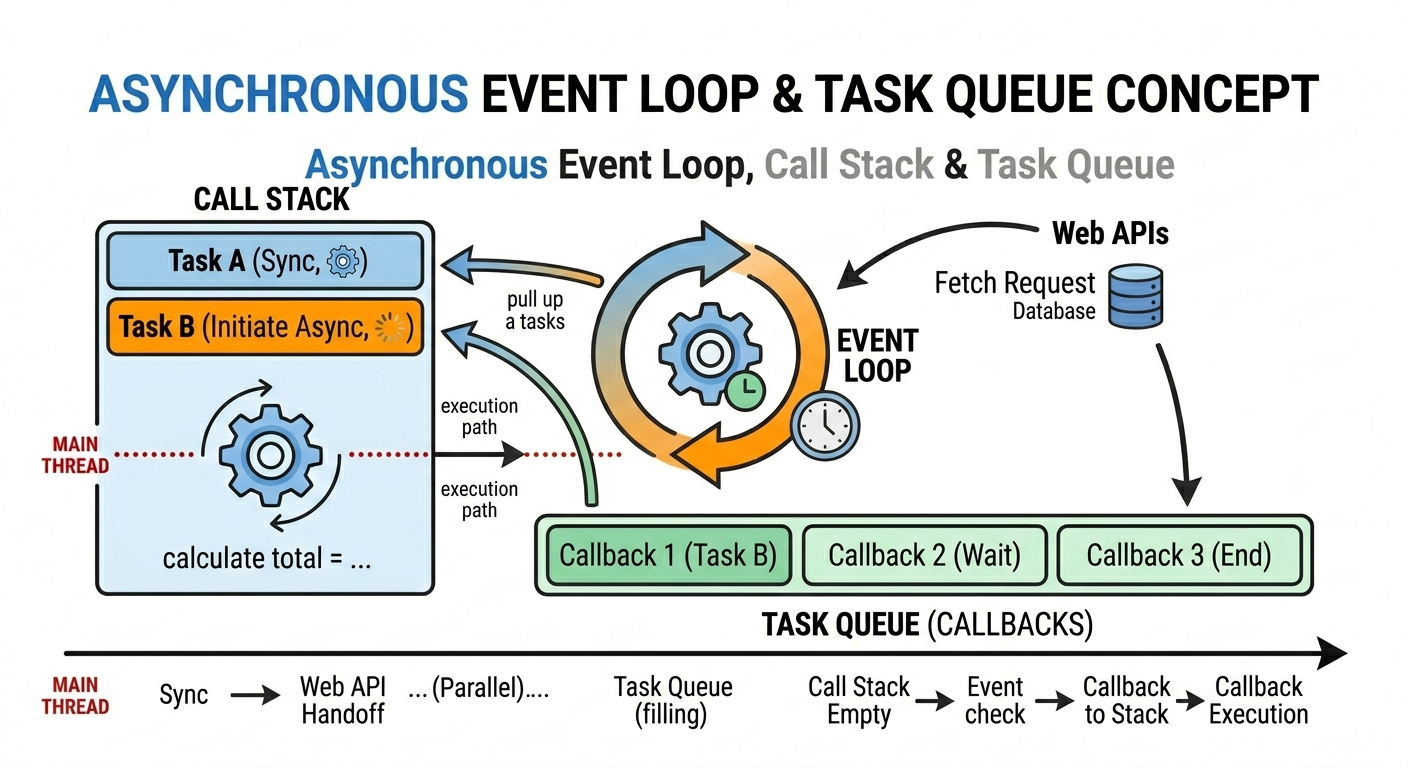
Simple Flow
Main code runs first
Async tasks go to background
When done → added to queue
Event loop picks them when stack is empty
Everyday Example: This is actually matter in real life, Waiting for Data 📦
Scenario
Think about real apps you use daily,
You open Instagram:
App loads instantly, Posts load slowly, You can still scroll, tap, click, all of this depends on async behavior.
This is asynchronous behavior in action.
If it were synchronous:
Screen would freeze, Nothing works, User closes the app
The Best Way to Think About It
Whenever you see async code, just think: “JavaScript is not waiting here.”
That’s it don’t overcomplicate.
Key Problems With Pure Synchronous (Blocking) Code
❌ UI Freezing
❌ Poor performance
❌ Bad user experience
❌ Slow apps
❌ Unresponsive buttons
That’s why modern JavaScript relies heavily on asynchronous patterns.
🔚 Final Summary (In Simple Words)
Synchronous → wait and execute step by step
Asynchronous → don’t wait, continue working
JavaScript needs async to stay fast and responsive
API calls, timers, and events are naturally asynchronous
Blocking code is dangerous for user experience
Final Thought
Asynchronous JavaScript is not about speed — it’s about smart waiting.
At the end of the day, everything comes down to one simple difference:
Synchronous code waits. Asynchronous code doesn’t.
JavaScript uses async because real-world tasks take time, apps need to stay responsive, users hate waiting
And once you start thinking like this:
Is this blocking or non-blocking?
You’ll never be confused again.


