How Dns Resolution Works
A step-by-step, beginner-friendly explanation of how DNS finds the right server

How does a browser actually find a website?
You already know that DNS is the phonebook of the internet.
But now comes the deeper (and more interesting) question:
👉 How does DNS actually resolve a name step by step? 👉 Who does the browser ask first? 👉 And how does it finally reach the correct server?
This article answers that using real commands and real flow, not theory.
What is DNS and why name resolution exists
Humans prefer names:
Computers prefer numbers:
- IP addresses
DNS (Domain Name System) exists to translate:
👉 Domain name → IP address
Without DNS:
You would type numbers into the browser
The internet would be impossible to use at scale
DNS solves this problem by organizing name resolution in layers, not chaos.
DNS resolution happens in layers
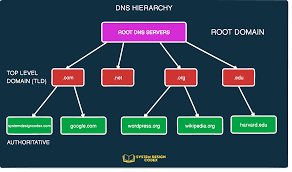
DNS does not work from one giant database.
Instead, it works like a chain of responsibility:
1️⃣ Root name servers 2️⃣ TLD name servers (.com, .org, .in) 3️⃣ Authoritative name servers (for the domain)
Each layer knows just enough to point you to the next one.
What is the dig command and when it is used
To understand DNS resolution properly, we need a tool.
That tool is dig.
👉 dig stands for Domain Information Groper.
In simple terms:
👉 dig lets you ask DNS questions and see the raw answers.
Developers and system engineers use dig to:
debug DNS issues
understand resolution paths
inspect name servers
It shows what usually happens behind the scenes.
Understanding dig . NS — Root name servers
Let’s start from the top.
dig . NS
What this means:
.represents the root of DNSNSasks: who are the name servers here?
The output shows:
- a list of root name servers
You’ll see:
.  IN NS a.root-servers.net.
.  IN NS b.root-servers.net.
...
.  IN NS m.root-servers.net.
Meaning
Important insight:
Root servers do not know IPs of websites
They only know which TLD servers to ask next
They are traffic directors, not address books.
Understanding dig com NS — TLD name servers
Next layer:
dig com NS
Output:
com.   IN  NS  a.gtld-servers.net.
com.   IN  NS  b.gtld-servers.net.
Now we are asking:
“Who is responsible for all .com domains?”
The response lists:
- TLD name servers for
.com
Key idea:
TLD servers do not know example.com’s IP
They only know who controls example.com
Again: responsibility, not resolution.
Understanding dig google.com NS — Authoritative name servers
Now we reach the domain level.
dig google.com NS
This asks:
“Which name servers are authoritative for google.com?”
Output:

These authoritative servers:
are responsible for google.com
store A, AAAA, MX, TXT records
This is where actual answers live.
Understanding dig google.com — Full DNS resolution
Now let’s ask the real question:
dig google.com
This returns:
A record (IPv4)
AAAA record (IPv6)
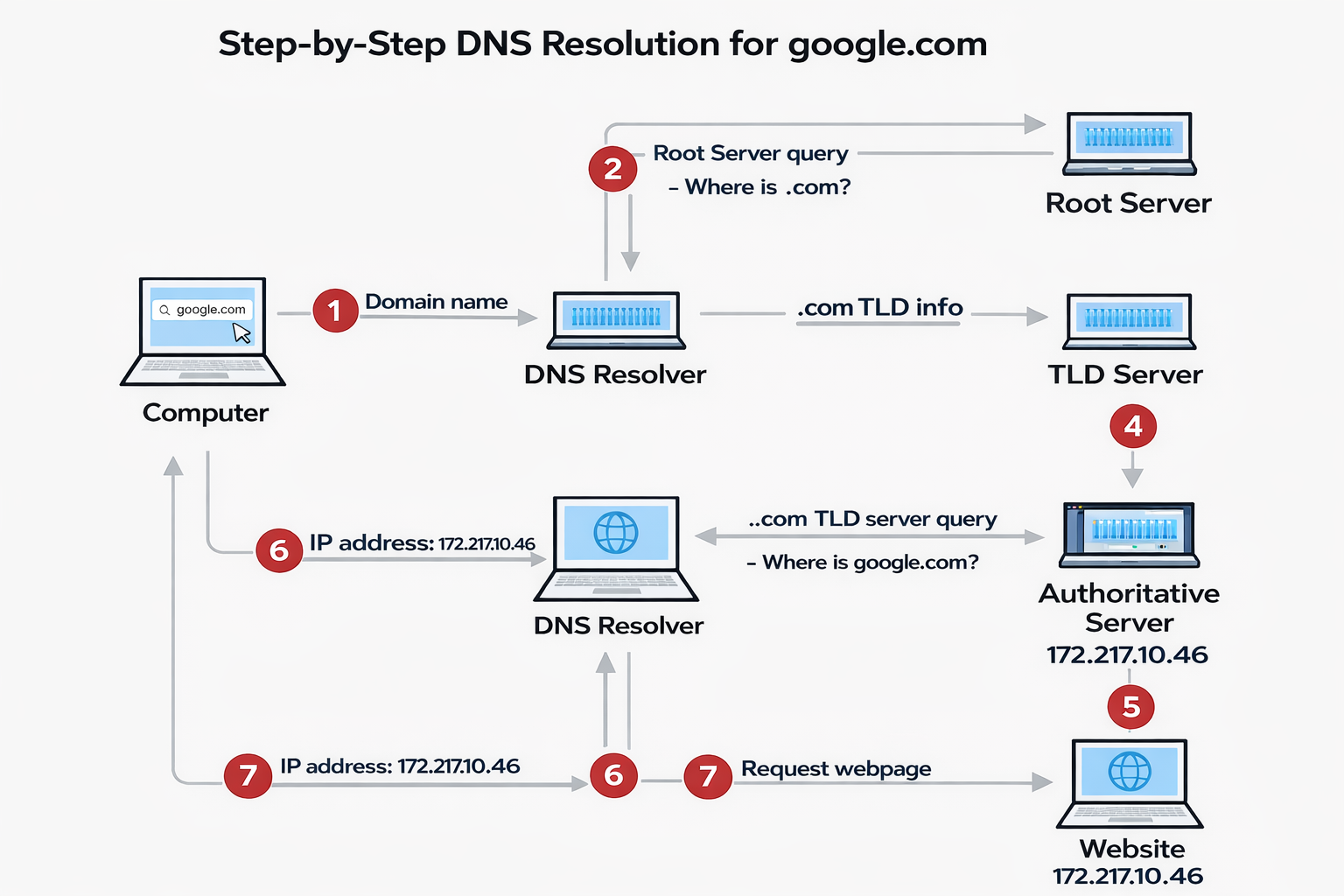
- Show: Resolver → Root → TLD → Authoritative → IP
Behind the scenes:
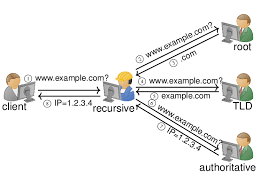
1️⃣ Recursive resolver asks root servers
2️⃣ Root points to .com TLD servers
3️⃣ TLD points to google.com name servers
4️⃣ Authoritative server returns IP address
→ Your browser never does this directly.
Role of the recursive resolver
Browser
   ↓
Recursive Resolver (ISP, system, or public DNS)
   ↓
Root NS → TLD NS → Authoritative NS
   ↓
IP Address
Your browser talks to a recursive resolver (ISP, system, or public DNS).
The resolver:
performs all DNS lookups
caches results
returns final IP to the browser
This makes DNS:
fast
scalable
reliable
Without recursive resolvers, DNS would be slow and noisy.
Connecting dig output to real browser requests
When you type:
Your browser:
does NOT call root servers
does NOT understand DNS hierarchy
It simply asks:
“Resolver, give me the IP for this name.”
The resolver uses the exact same flow you saw with dig.
That’s the big connection.
Final thoughts
DNS resolution is not magic.
It’s a well-designed, layered system built for:
scale
reliability
clarity of responsibility
Once you understand:
root
TLD
authoritative servers
You understand how the internet finds anything.


